 NotchDude
Download
NotchDude
Download
What’s new in NotchDude 1.12: Fold as you close the lid
Fold is an optional Pro animation that blurs and darkens your MacBook’s display as you close the lid. Screen Recording permission adds the full desktop animation. Version 1.12.1 also fixes AI Usage cards overflowing while resizing.
An animation as you close the lid
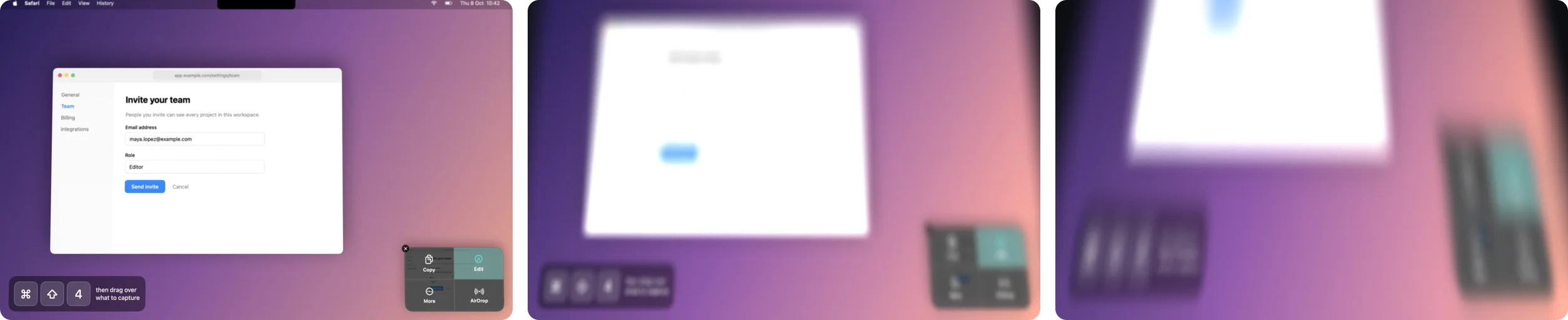
NotchDude 1.12 adds Fold. Lower your MacBook’s lid and the desktop appears to move closer, blur, and fade to black. Open the lid again and the effect clears. It runs on the built-in display of supported MacBooks and is included in Pro and the 48-hour trial.
Try it in Settings
- Open Settings › General › Closing the Lid.
- Choose Fold.
- Click Preview to play the animation without closing the lid.
Choose Off to disable it. Hovering the Fold tile shows a small sample even without Pro.
Screen Recording is optional
The full animation uses one screenshot of your display, taken when you start closing the lid. macOS requires Screen Recording permission to take that screenshot. Fold then animates the screenshot as the lid moves.
The screenshot stays in memory and is discarded when the effect ends. It is never saved or uploaded, and Fold does not record video. Leave permission off if you prefer: the display will blur and darken instead.
Keep the defaults to start
Fold starts when you lower the lid a little from its usual working position. You can leave the angle controls at their defaults. If the display becomes black too early, lower Full effect at, or click Reset.
Automatic Fold needs a readable lid-angle sensor. Settings tells you when this Mac cannot report its angle; Preview still works on its built-in display. See the setup guide for the angle controls and troubleshooting.
1.12.1: AI Usage fits while resizing
10 October 2026: 1.12.1 fixes AI Usage cards overflowing at intermediate sizes. Cards select a fitting presentation throughout resizing. Narrow cards use limit bars and stacked token totals, charts appear below the totals when space allows, and the footer stays separate.
Credit
The animation is adapted from Still, a separate open-source project by Akshay Sharma and Kavish Shah. It is already included in NotchDude; you do not need to install Still. Its MIT licence is in Settings › About › Open-Source Licences.
Try NotchDude on your Mac.
Fold is part of Pro and the 48-hour trial. macOS 14 or later, Apple silicon.
Download for Mac