
What’s new in NotchDude 1.14: A notch made of glass
The open notch is clear Liquid Glass with a rounder shape, the tabs float in a pill below it, quick controls are a right-click away, and Pro keeps unlimited clipboard history.
Clear glass, rounder shape
On macOS 26 and later, the open notch is solid black where it meets the bezel, so it still looks like part of your Mac, then melts into Liquid Glass over its lower part. Your desktop shows through sharp and grey, and the glass bends it into streaks along the bottom edge. The corners are rounder, the shoulders flare wider into the menu bar, and a thin white rim follows the bottom and both corners.
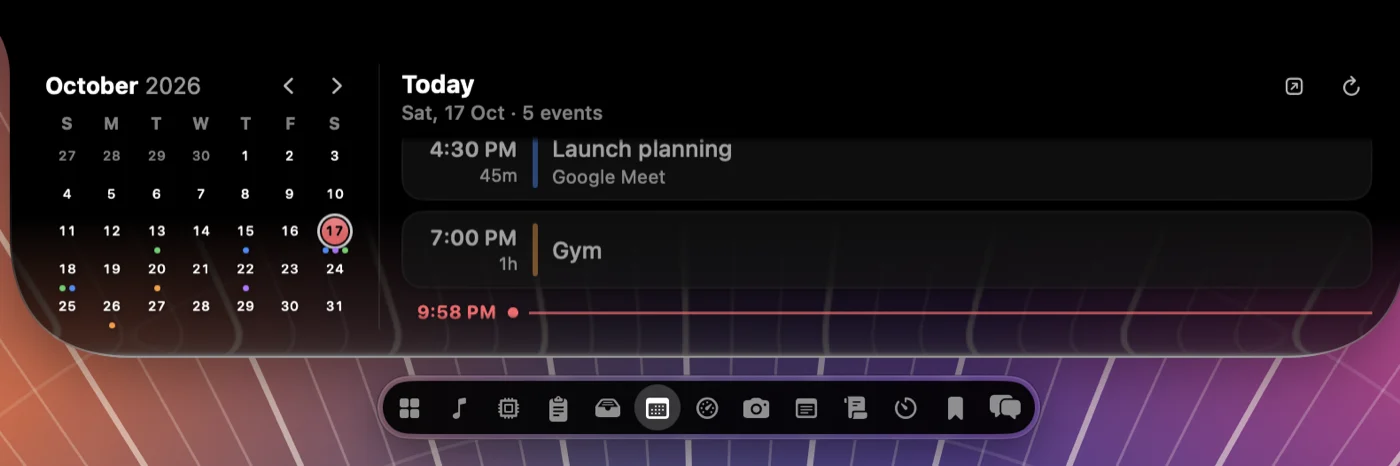
Widget cards are dark see-through glass, so card text stays readable whatever is behind the notch. The glass is the same for everyone: the Glass and Tint settings are gone, and it stays dark over light windows. Before macOS 26, the open notch keeps its frosted glass and coloured edge light.
Tabs in a pill below the notch
The tabs have moved out of the band beside the notch into a black glass pill just under the panel. With the notch’s own width out of the way, the pill fits up to 15 tabs at the standard width, where the old header fitted three; a » menu holds any more.

Click a tab or press ⌘1 to ⌘9. Drag a tab sideways to reorder it, or up onto Home to add it there. Hold a tab to remove tabs or bring back ones you removed.
Right-click for quick controls
The ··· button is gone. Right-click the notch, open or closed, for your plan, Keep Mac Awake, Options (Expand on Hover, File Shelf, Launch at Login), Settings, Customize, Help, and Quit. The menu is dark whatever your system appearance. ⌘, still opens Settings and ⌘Q still quits.
Fewer buttons
- No pin. Click anywhere outside the notch to close it, including when you opened it from the keyboard or the menu bar. The Teleprompter still keeps the notch open while a script plays.
- No edit button. Hold a Home tile, or an empty part of Home, to edit Home. The widget tray shows each widget as its Mac app: Calendar, Notes for Jots, Messages for Chats, Activity Monitor for System, Finder for Shelf, and so on.
- Buttons show a plain highlight under the pointer instead of a glass bubble.
Unlimited clipboard history on Pro
Clipboard history now lives in its own small database on your Mac, one row per copy, readable only by you. Pro keeps every copy instead of the last 100. Free still shows the last 10, and keeps up to 100 behind the scenes so they’re there if you upgrade. Pinned items are never trimmed, history from earlier versions moves over on first launch, and passwords and other copies marked private are still never recorded.
Try NotchDude on your Mac.
Free to try for 48 hours. macOS 14 or later, Apple silicon.
Unlock Pro · $6.99 once