
The MacBook Pro's notch is now a Dynamic Island. Here's how to get one on the Mac you already have
For five years, the black cutout at the top of the MacBook screen did one thing: hold a camera. On 28 October, Apple finally gave it a job. The new MacBook Pro turns the notch into a Dynamic Island you can tap. The catch? It starts at $2,899, and it doesn't come to any Mac you already own. Here's what it does, what Apple left out, and how to get the same idea on the Mac on your desk right now. Still on an M1 MacBook Air with no notch at all? You can have one too.

The short version: the Dynamic Island is only on the 14-inch and 16-inch MacBook Pro with a PROLED XDR display, from 6 November. It shows Live Activities, Spotlight, and Siri AI, and you can tap it. Touch ID stays, and Apple doesn't mention Face ID. Every other Mac keeps a silent notch, or has none. NotchDude adds a Dynamic Island to any Apple silicon Mac: on a notched MacBook it wraps around the notch, and on an M1 MacBook Air or any Mac without one it floats a pill at the top of the screen that opens like Apple's. You can try it free.
What Apple announced
Apple announced the new MacBook Pro on 28 October 2026. Pre-orders opened the same day, and the first machines arrive on Friday, 6 November. It's the biggest change to the MacBook Pro's display since the notch itself.
| What's new | Details |
|---|---|
| Display | PROLED XDR, a tandem OLED panel. Up to 2000 nits peak, 10,000,000:1 contrast, ProMotion 10–120Hz, nano-texture option |
| Touch | The first Mac touchscreen. Swipe to scroll, pinch to zoom, double-tap to fill the screen, flick to tile a window |
| Dynamic Island | Replaces the notch. Apple calls it the new home for Spotlight, Live Activities, and Siri AI |
| Chips | M5 Pro or M5 Max, up to 128GB unified memory |
| Size and weight | 14.2-inch and 16.3-inch displays, from 3.0 lb and 4.0 lb, slightly thinner than before |
| Battery | Up to 24 hours (16-inch with M5 Pro) |
| Price (US) | From $2,899 (14-inch) and $3,399 (16-inch), about $400 more than the mini-LED model with the same chip |
The mini-LED MacBook Pro stays on sale with its notch and no touchscreen. So does the MacBook Air. For now, the Dynamic Island is a PROLED-only feature.
How the MacBook Pro's Dynamic Island works
If you've used an iPhone since the 14 Pro, you already know the idea. The black shape around the camera stays small when nothing's happening, then grows to show what is. On the Mac, Apple gives it three jobs:
- Live Activities. Things that are happening now. Apple's examples: the song that's playing, picking up a call, an AirDrop request, and tracking a food delivery.
- Spotlight. Search moves into the island. Apple's fine print says this only happens when Siri AI is available and turned on.
- Siri AI. Siri AI lives in the island too. It's in beta, in English, French, Japanese, Korean, Portuguese, and Spanish, and Apple's fine print says it isn't available in the EU at first.
The part that's genuinely new is touch. Because the PROLED XDR screen is a touchscreen, Apple says you can accept an AirDrop request or pause a song with a tap of your finger, without moving your hand to the trackpad. On a laptop, where the top of the screen is the part closest to your eyes and furthest from your hands, that's an interesting bet. We'll know whether it feels natural once people have them on their desks.
From notch to island: how we got here
- October 2021: the 14-inch and 16-inch MacBook Pro with M1 Pro and M1 Max bring the notch to the Mac. macOS treats it as dead space in the menu bar.
- September 2022: the iPhone 14 Pro turns its cutout into the Dynamic Island. Mac owners start asking why their notch can't do the same.
- 2022 onward: the M2 MacBook Air gets a notch too. Third-party notch apps fill the gap with music controls, file shelves, and calendars around the cutout.
- 2026: Bloomberg reports that a Dynamic Island is coming to an OLED MacBook Pro, and code found in macOS 27 points the same way.
- 28 October 2026: Apple makes it official, together with the first Mac touchscreen.
In other words, Apple has confirmed what notch apps have been saying for years: the space next to the camera is too useful to leave empty.
The camera, Touch ID, and no Face ID
The cutout still holds a 12MP Center Stage camera with Desk View. Apple added video stabilisation so your picture stays steady when you touch the screen during a call, and a newly designed hinge for more stability while you use touch.
If you hoped the island meant Face ID, not this time. Apple lists Touch ID for unlocking your Mac, signing in to apps, and making payments, and doesn't mention Face ID at all. You'll still unlock with the button in the top-right of the keyboard.
Which Macs get the Dynamic Island?
| Mac | Apple's Dynamic Island? |
|---|---|
| MacBook Pro 14-inch and 16-inch with PROLED XDR (2026) | Yes |
| MacBook Pro with mini-LED Liquid Retina XDR, including M5 | No, notch |
| MacBook Pro 14-inch and 16-inch, M1 Pro to M4 (2021–2025) | No, notch |
| MacBook Air, M2 and later | No, notch |
| MacBook Neo (A18 Pro, 2026) | No, no notch |
| MacBook Air M1, 13-inch MacBook Pro | No, no notch |
| iMac, Mac mini, Mac Studio, Mac Pro, external displays | No, no notch |
Apple hasn't said the Dynamic Island will come to any other Mac in a software update. It's presented as part of the PROLED XDR hardware, alongside the touchscreen, so it's safer not to wait for it. Not sure what you have? See which MacBooks have a notch.
How to get a Dynamic Island on an older Mac
Here's the good news if your Mac isn't a $2,899 PROLED MacBook Pro. You don't need new hardware for most of what makes the Dynamic Island useful. What you see depends on your Mac:
- A MacBook with a notch (MacBook Air M2 and later, MacBook Pro 14-inch and 16-inch): NotchDude wraps around the notch, so the cutout itself becomes the island.
- A Mac without a notch (MacBook Air M1, MacBook Neo, iMac, Mac mini, or an external monitor): there's no cutout to wrap, so NotchDude floats its own island at the top centre of the screen. See it on a Mac without a notch.

Hover over it, or click it, and it opens into a full panel:
- Now Playing: artwork with play, pause, and skip for Apple Music and Spotify (seek, volume, shuffle, and repeat with Pro), plus YouTube and other media in Safari, Chrome, and Firefox with the browser extension.
- AirDrop from the notch: drop files on the File Shelf, then AirDrop, share, or drag them out later.
- Your next meeting: a month calendar with today's events and one-click Join, and the next event can sit in the closed notch.
- Timers: Pomodoro focus sessions with breaks and a daily count.
- Things Apple's island doesn't do: clipboard history, quick notes with reminders, a System monitor, and Claude Code and Codex usage limits.


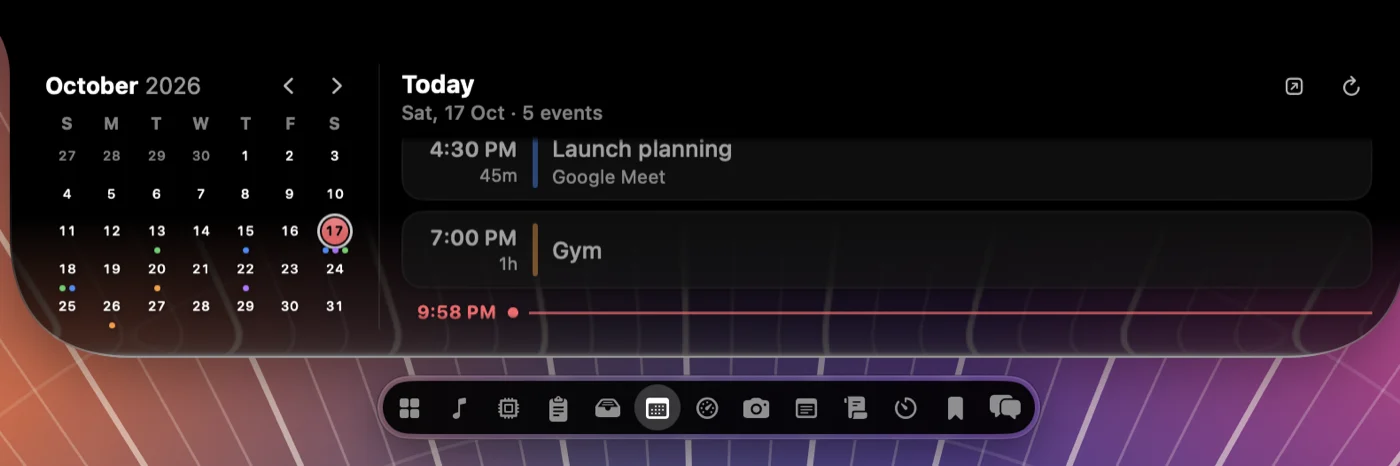
No notch at all? M1 MacBook Air, iMac, and Mac mini
Millions of Macs never had a notch: the M1 MacBook Air, the 13-inch MacBook Pro, this year's $599 MacBook Neo, every iMac, Mac mini, and Mac Studio, and any external monitor. They're left out of Apple's Dynamic Island twice: no notch, and no PROLED screen. NotchDude doesn't need either.
When macOS reports no camera cutout on a screen, NotchDude draws its own island instead of wrapping a notch:
- A floating pill sits just below the top edge, in the centre of the screen, with rounded corners all the way round, so it doesn't pretend to be hardware.
- Closed, it shows what's happening: album art and moving equaliser bars while music plays, a countdown while a focus timer runs, and the title of a new message or reminder. The middle shows a NotchDude label, or your own text.
- Open, it's the same panel as on a notched MacBook: music, calendar, clipboard, File Shelf, notes, focus timer, and the rest.


| Mac | Notch | Apple's Dynamic Island | With NotchDude |
|---|---|---|---|
| MacBook Pro with PROLED XDR (2026) | Dynamic Island | Yes | Not tested yet |
| MacBook Pro 14/16-inch with mini-LED (2021 onward) | Yes | No | Island around the notch |
| MacBook Air, M2 and later | Yes | No | Island around the notch |
| MacBook Air M1, 13-inch MacBook Pro M1/M2 | No | No | Floating island |
| MacBook Neo (A18 Pro) | No | No | Floating island (not tested yet) |
| iMac (Apple silicon) | No | No | Floating island |
| Mac mini, Mac Studio, Mac Pro | No | No | Floating island (choose Active Display if it doesn't appear) |
| External monitor or lid closed | No | No | Floating island (Active Display, or every display with Pro) |
| Intel Macs | Varies | No | Not supported |
Choose where it appears in Settings › General › Displays › Show on. Built-in Display is the default and suits MacBooks and iMacs. Active Display uses the screen your pointer is on when NotchDude starts, when you plug in or unplug a display, or when you choose Show NotchDude. That's what you want on a Mac mini, Mac Studio, Mac Pro, or a MacBook with the lid closed. All Displays puts an island on every screen at once and is part of Pro.
If you have an M1 MacBook Air, this is the cheapest way to get a Dynamic Island on a Mac: it's a $6.99 app, not a $2,899 laptop. Other notch apps handle Macs without a notch differently. NotchNook shows a small handle, DynamicLake Pro lets you pick monitors, and Atoll needs a real notch. See the best notch apps compared.
Apple's island vs NotchDude
They aren't the same thing, and it's worth being clear about where each one wins.
| Apple's Dynamic Island | NotchDude | |
|---|---|---|
| Macs | PROLED MacBook Pro only | Apple silicon Macs with macOS 14 or later |
| Macs without a notch and external displays | No | Floating island (every display with Pro) |
| Music controls | Yes | Yes, with artwork |
| AirDrop | Accept requests | Send from the File Shelf |
| Spotlight and Siri AI | Yes | No |
| Tap with your finger | Yes | No, hover or click |
| Calendar, focus timer, notes | Not announced | Yes |
| Clipboard history, AI usage limits | Not announced | Yes |
| Cost | From $2,899 for the Mac | Free plan, or Pro for $6.99 once on up to 3 Macs |
If you buy a PROLED MacBook Pro, Apple's island is built in, and touch is something no app can add to an older screen. For everyone else, NotchDude is the way to get a Dynamic Island today. I haven't tested NotchDude on a PROLED MacBook Pro yet; I'll check how the two sit together once the machines ship and update this post.
Set it up in five minutes
- Check your Mac. Open Apple menu › About This Mac. You need a Mac with Apple silicon and macOS 14 Sonoma or later. Intel Macs aren't supported.
- Install NotchDude. Download it, open the disk image, and drag NotchDude to Applications. It's signed and notarized by Apple.
- Open it. On a notched MacBook it wraps around the notch. On an M1 MacBook Air or iMac, a floating island appears at the top centre. On a Mac mini, Mac Studio, or Mac Pro, if nothing appears, set Settings › General › Displays › Show on to Active Display.
- Allow only what you use. Music control asks for Automation access, and the calendar for Calendar access. Skip anything you don't need.
- Turn on launch at login in Settings, so the island is there every time you start your Mac.
Every new install starts with 48 hours of Pro, with no card and no account. Afterwards you keep the free plan: music, focus, notes, the calendar, a 10-item clipboard, and a 3-file shelf. More tips are in how to get a Dynamic Island on your Mac and the NotchDude guide.
Should you upgrade or wait?
- Buy the PROLED MacBook Pro if you were due a new pro laptop anyway, and you want the OLED screen, touch, and long battery life. The Dynamic Island is a bonus, not a reason on its own.
- Keep your current Mac if it's fast enough. The Dynamic Island alone isn't worth $2,899, and an app gets you most of the way there.
- Wait if you care about third-party Live Activities. Apple hasn't said whether other Mac apps can use the island, or how. Reviews after 6 November should tell us more.
Bottom line: Apple's Dynamic Island proves the notch deserved a job. You don't have to buy a new Mac to give yours one.
What we don't know yet
- Third-party Live Activities: on iPhone, apps use ActivityKit. Apple hasn't said whether Mac apps can do the same.
- Customisation: there's no word on hiding the island, choosing what it shows, or adding widgets.
- Other countries and languages: Siri AI is in beta in six languages and not in the EU at first, and Spotlight only moves into the island where Siri AI is available.
I'll update this post as reviews and Apple's developer documentation fill these in.
FAQ
Which MacBooks have a Dynamic Island?
Only the 14-inch and 16-inch MacBook Pro with the PROLED XDR display, announced on 28 October 2026 and available from 6 November. The mini-LED MacBook Pro, the MacBook Air, and every earlier Mac keep the notch or have none.
Will older MacBooks get the Dynamic Island in a software update?
Apple hasn't said so. It presents the Dynamic Island as part of the new PROLED XDR hardware, alongside the touchscreen, so don't count on it coming to older Macs. A notch app such as NotchDude adds a Dynamic Island to any Apple silicon Mac today.
Can I get a Dynamic Island on my M1, M2, or M3 MacBook?
Yes, with an app. NotchDude runs on any Apple silicon Mac with macOS 14 or later. It wraps around the notch on notched MacBooks and shows a floating island on the M1 MacBook Air, iMac, Mac mini, and external displays.
Does NotchDude work on a Mac mini or Mac Studio?
Yes. Those Macs have no built-in screen, so if nothing appears, set Settings › General › Displays › Show on to Active Display, and a floating island appears at the top of the screen you're using. With Pro, All Displays puts one on every monitor.
Does the new MacBook Pro have Face ID?
Apple lists Touch ID for unlocking your Mac, signing in to apps, and making payments, and doesn't mention Face ID. The cutout holds the 12MP Center Stage camera.
Can I tap the Dynamic Island on a MacBook Pro?
Yes. The PROLED XDR display is a touchscreen, and Apple's examples include pausing a song or accepting an AirDrop request with a tap.
Is NotchDude free?
The free plan keeps music, focus, notes, calendar, a 10-item clipboard, and a 3-file shelf on one display. Pro is a one-time purchase for up to 3 Macs and adds full music controls, unlimited clipboard and shelf, AI usage limits, a screenshot editor, and every display. Every new install starts with 48 hours of Pro, with no card.
Your Mac can have a Dynamic Island today
No $2,899 upgrade needed. NotchDude turns the notch on any Apple silicon MacBook into a Dynamic Island, and shows a floating island on Macs and displays without one.
Or try Pro free for 48 hours, no card needed · macOS 14+ · Apple silicon