 NotchDude
Download
NotchDude
Download
10 everyday Mac annoyances, and how the notch fixes them
None of these are big problems. You copy over something you needed, your Mac dozes off halfway through a download, you dig through a calendar invite for the meeting link. Each one costs a few seconds and a bit of focus, many times a day. I built NotchDude because I kept running into them myself, and the notch, the one spot on the screen that's always visible and never used, turned out to be the right place to fix them.
1. "I copied over the thing I needed"
The Mac clipboard holds one item. Copy a link, then copy a command, and the link is gone. You go back to the tab, find it again, and copy it again.
The fix: Clipboard in the notch keeps the text you copy. Search it, click an item to copy it again, and pin the snippets you reuse every day. Copies that password managers mark as private are never saved, and the history stays on your Mac. Free keeps your last 10 items; Pro keeps 100 with on-device summaries.

2. "My Mac went to sleep in the middle of a download"
Browser downloads, Terminal builds, and video calls in a tab often don't tell macOS to stay awake, so the screen dims and the Mac sleeps. Changing your sleep settings works, until you forget to change them back.
The fix: Keep Mac Awake (free) is in the notch's ··· menu: 30 minutes, 1 hour, 2 hours, or until you turn it off. A small cup on the closed notch reminds you it's on, and it switches itself off when the time is up. More options are in our guide to keeping your Mac awake.
3. "I switch apps just to pause the music"
Someone talks to you, a call comes in, a song you hate starts. To pause or skip, you leave what you're doing, find Spotify or Music, and come back.
The fix: Music (free) shows the artwork and play, pause, and skip right in the notch, with album art on the closed notch while something plays. With the browser extension, YouTube and other browser media work there too. Pro adds seeking, volume, shuffle, and repeat.
4. "Where's the link for this meeting?"
Two minutes to the call, and the Zoom or Meet link is buried in an invite, an email, or a calendar app you have to open first.
The fix: Calendar (free) shows today's events in the notch with "Now" and "in 10 min" labels. Events with a Zoom, Google Meet, Teams, Webex, or FaceTime link get a Join button from 10 minutes before. It reads the calendars already on your Mac, including iCloud, Google, and Exchange.
5. "Claude Code cut me off mid-task"
If you code with AI agents, you know the feeling: you're deep in a change and hit your 5-hour limit, with no warning and no idea when it resets.
The fix: AI Usage (Pro) shows your Claude Code and Codex 5-hour and weekly limits with reset countdowns, turning orange at 70% and red at 90%. It also shows when an agent is working or waiting for you. Usage is read from the tools' local logs, never your prompts or code. There's a longer write-up on planning around limits.
6. "I need somewhere to put this file for a minute"
Moving a file between two apps means juggling windows, or dropping it on an already cluttered Desktop and hunting for it later.
The fix: drag it onto the notch. The File Shelf holds files, screenshots, and links until you drag them out into any app. Hold a drag over the notch to zip, merge PDFs, convert images, copy the text from an image, or AirDrop as you drop, all on your Mac. Free holds 3 files; Pro removes the limit. See the file shelf guide for more.

7. "My Desktop is full of screenshots"
Every screenshot lands on the Desktop, and adding an arrow or blurring an email address means opening another app.
The fix: NotchDude's screenshot thumbnail (free) has four actions you choose, such as Copy, AirDrop, or putting it on the shelf, and you can drag it straight into any app. In Settings › Files you can move new screenshots off the Desktop onto the shelf. With Pro, Edit opens a screenshot editor with arrows, text, numbered steps, blur, crop, and backgrounds. Here's how to annotate a screenshot on a Mac.
8. "Why is my Mac slow, and what's using it?"
The fans spin up or everything feels sluggish, and Activity Monitor is a wall of process names.
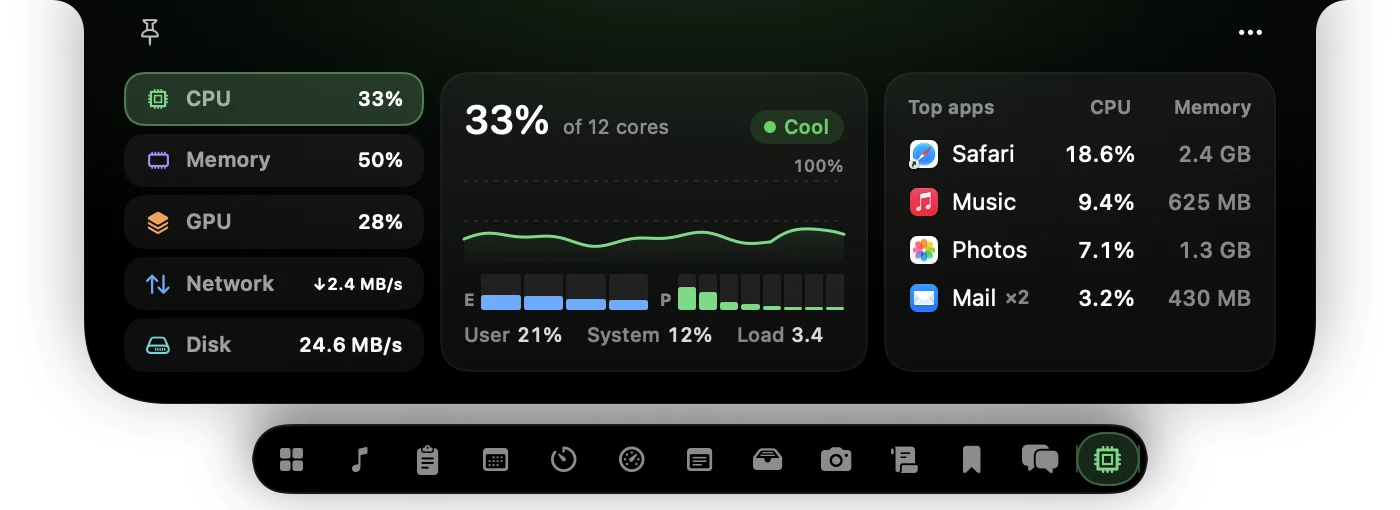
The fix: the System widget (free) shows CPU, memory, GPU, network, and disk with live graphs, and lists the apps using the most, with helper processes counted under their app. It also shows how full your startup disk is and warns when it's running low. You can put CPU and RAM on the closed notch to keep an eye on them.
9. "I had a thought, and nowhere quick to put it"
An idea or a to-do pops up mid-task. Opening Notes, finding the right note, and typing it in is just enough friction that you don't, and it's gone.
The fix: press ⌃⌥N in any app and the notch opens on a fresh note, ready to type. Click the bell to be reminded in 15 minutes, this evening, or tomorrow morning, and the notch brings the note back with a chime.
10. "I can't stay focused"
Pomodoro timers help, but a separate app or a browser tab is one more thing to forget about.
The fix: Focus (free) is a Pomodoro timer in the notch: 25 minutes of focus, then breaks, with a longer break every fourth session. The countdown stays on the closed notch, so a glance up tells you how long is left. More in our Pomodoro app roundup.
A few more
- "Do I look OK for this call?" Mirror (Pro) shows a live camera preview in the notch. The camera is only on while it's open, and nothing is recorded.
- "I keep looking away to read my notes on calls." The Teleprompter (Pro) scrolls your script right under the camera.
- "I keep checking WhatsApp and Slack." Messages (Pro) shows new WhatsApp, Slack, and Teams chats in the notch.
- "The notch just wastes space." It's still a cutout, but now it's the most useful part of your screen. No notch? NotchDude becomes a floating island at the top of the display.
Why the notch?
Each of these could be its own menu bar app, and many people end up with a dozen. The notch is different: it's in the same place on every screen, you can reach it with a flick of the pointer, and it stays out of the way until you need it. One place for the small things means fewer apps to remember, fewer icons fighting for menu bar room, and less switching away from your work.
FAQ
Which of these fixes are free?
Clipboard history (10 items), Music controls, Keep Mac Awake, Calendar with one-click Join, Focus, Notes, the System widget, the screenshot thumbnail, and a 3-file File Shelf are free to keep. AI Usage, the screenshot editor, Mirror, Messages, 100 clipboard items, and an unlimited shelf need Pro. Every Pro feature is included for the first 48 hours.
Does NotchDude work on a Mac without a notch?
Yes. On Macs and external displays without a notch, it becomes a floating island at the top of the screen. The free plan uses one display; Pro supports every display.
Does NotchDude upload my clipboard or notes?
No. Clipboard history, notes, and the File Shelf stay on your Mac, and copies that password managers mark as private are never saved. See the privacy policy for every network request the app makes.
Fix the small stuff from your notch
Clipboard, Music, Calendar, Focus, Notes, System, and Keep Mac Awake are free to keep. Your first 48 hours include every Pro feature, with no card needed.
macOS 14+ · Apple silicon